Customer Orders Tabs
How to Navigate: Click on Sales > Customer Orders > Tabs
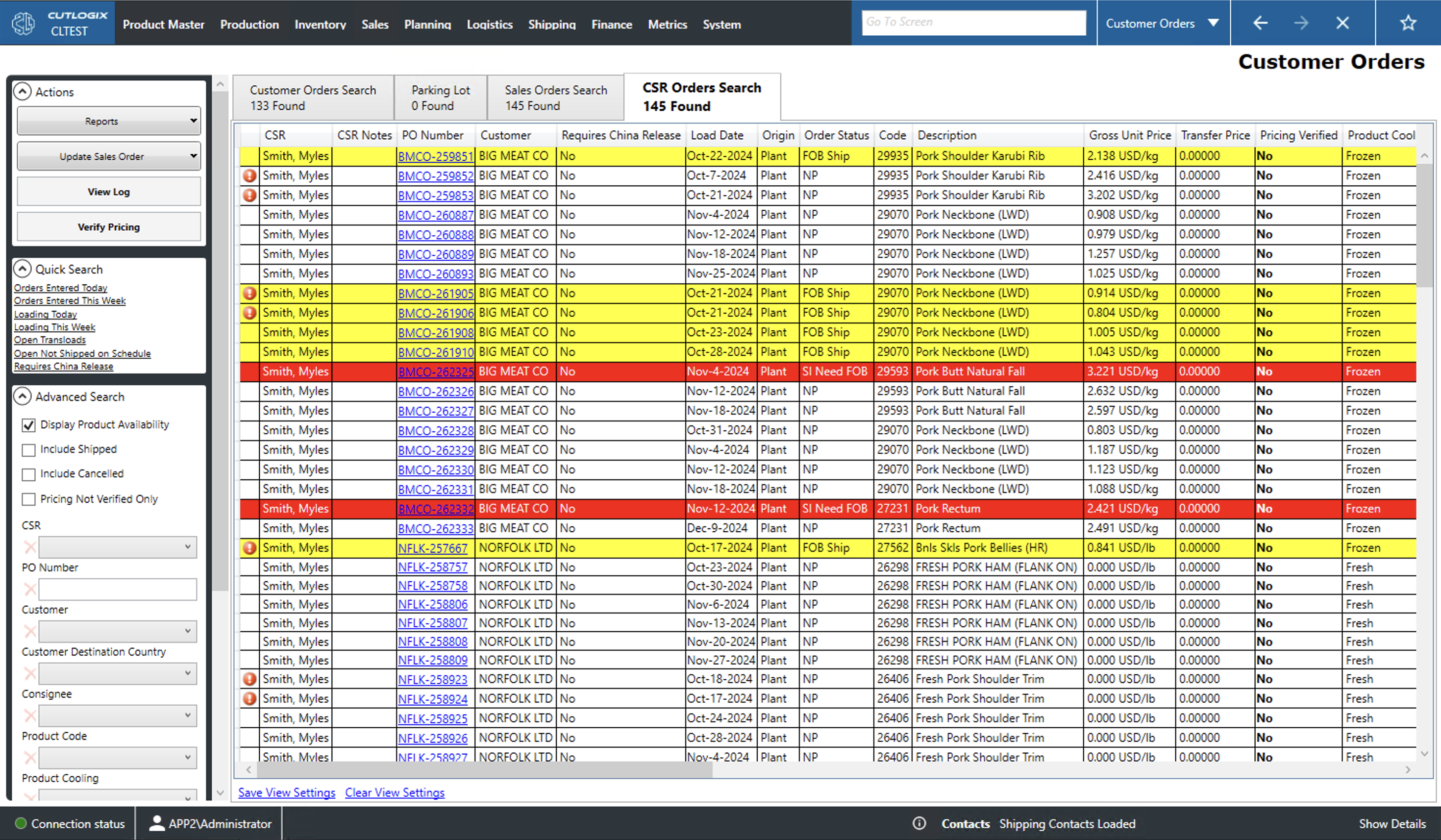
Customer Orders Search
- Customer: The name of the customer.
- PO Number: The Product Order (PO) Number. This is a unique identifier for the order.
- MES Order #: The number used to track the order in the Manufacturing Execution System (MES).
- Order Status: The status of the sales order.
- Not Verified: A new order that has not passed review.
- Planning: The order is in the planning system to be produced.
- Shipped: The order has been planned, loaded and shipped to the customer.
- SNB: The order has been shipped but not billed.
- Cancelled: The order will no longer be produced for the customer.
- Revision Status: The revision status of the order.
- CSR: The order has been entered by the customer service representative (CSR) but not yet reviewed.
- Revision Requested: The order has been reviewed and requires changes.
- Revised: The CSR has revised the order according to feedback and re-submitted it for review.
- Confirmed: The order has passed review and can now be planned by the planning system.
- Product Cooling: Indicates whether the customer order contains fresh, frozen or chilled products. Orders typically reflect a single load (i.e. semi trailer or shipping container). Thus, orders do not mix product cooling types.
- Sample: Indicates whether the order is shipped as a product sample.
- Requires China Release: Indicates whether the order requires special documentation to ship to China.
- Origin: The location from which the order is shipped.
- Destination: Location where the order is to be shipped.
- Shipping Period: The half of the month this order will be shipped (FH for first half and LH for last half).
- Load Date: The date that this order will be loaded/shipped.
- Delivery Date: The date that this order is planned to arrive at its destination.
- Loading Type:
- Pallet: This order will be loaded onto a truck.
- Floor: This order will be loaded onto a shipping container.
- Load Id: Unique identifier for the load that contains this order.
- Est. Net Weight: Estimated weight of the product minus the weight of its packaging.
- Est. Gross Weight: Estimated weight of the product including the weight of its packaging.
- Cert #: Unique identifier for the shipping certificate.
- Scanning Status: The scanning status of the order.
- Not Started: Scanning the order into the MES has not started.
- In Progress: Scanning the order into the MES is underway.
- Complete: Scanning the order into the MES is complete.
- Complete - Short: Scanning the order into the MES is complete but the order has been shorted (not all ordered product is available to ship).
- Booking Status: Indicates the status of order's booking for loading on a ship.
- AM Cutoff: Whether or not this order must be produced in the morning.
- Air Freight: Indicates whether this order will be shipped by plane.
- Changes: Records with an 'i' icon have attached changes. Clicking the icon will bring up a pop up that lists information about the changes made to the order.
Parking Lot Tab
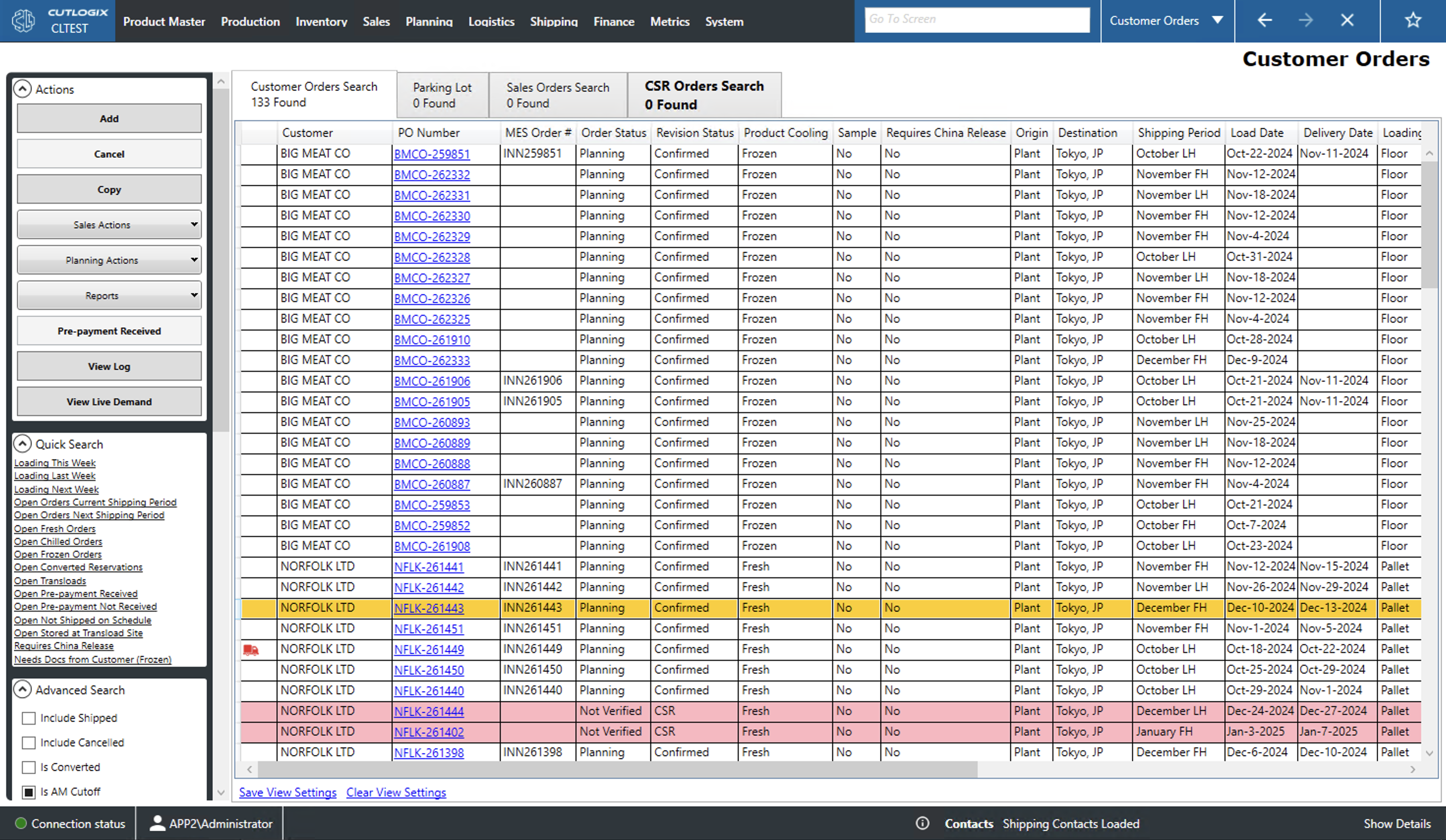
New customer orders that have not yet been completed can be saved to the parking lot. Orders in the parking lot will not appear to the planning system to have thier production scheduled. Using the actions on the left sidepod users can manipulate the orders in the parking lot:
- Add: Adds a new order directly to the parking lot.
- Edit: Edits the currently selected order (highlighted in yellow).
- Remove: Removes the currently selected order.
- Reload: Reloads the list displaying the most up to date info from the data base.
Sales Orders Search
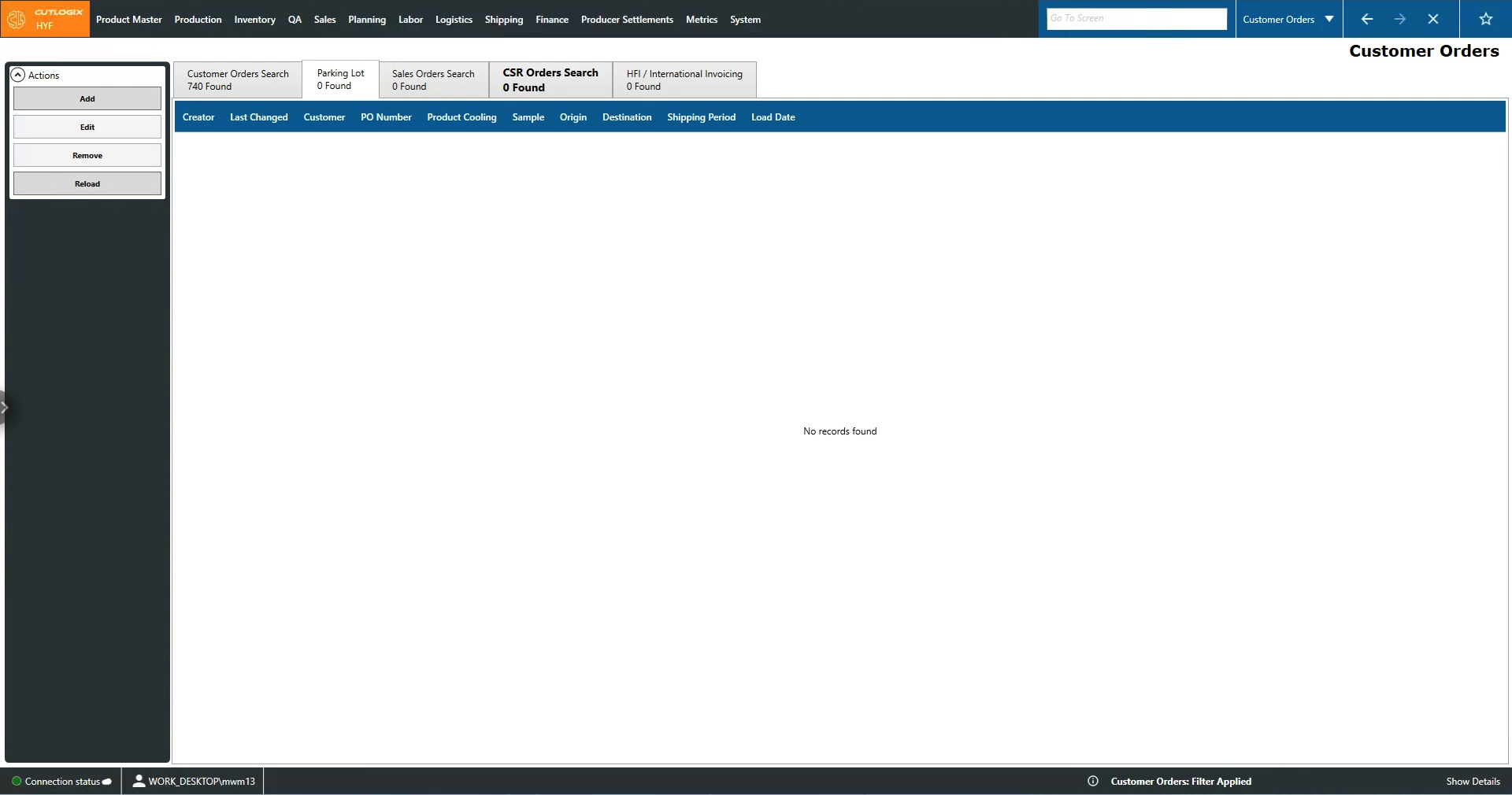
- Customer: The name of the customer who made the order.
- Inventory Notes: A space for notes on the sales order's inventory.
- PO #: The Product Order (PO) Number. This is a unique identifier for the order.
- MES Order #: The Manufacturing Execution System order number. This would be the number used to track the order in a system like Innova.
- Sample: Indicates whether the order is a product sample or not.
- Requires China Release: Indicates whether the order requires special documentation to ship to China.
- Order Status: The status of the sales order.
- Not Verified: A new order that has not passed review.
- Planning: The order is in the planning system to be produced.
- Shipped: The order has been planned, loaded and shipped to the customer.
- SNB: The order has been shipped but not billed.
- Cancelled: The order will no longer be produced for the customer.
- Shipping Period: The half of the month this order is will ship (FH for first half and LH for last half).
- Load Date: The date that this order will be loaded.
- Received Date: The date on which the order was received by the consignee.
- Delivery Date: The date that this order is planned to arrive at the customer's destination.
- Revision Status: The revision status of the order.
- CSR: The order has been entered by the customer service representative (CSR) but not yet reviewed.
- Revision Requested: The order has been reviewed and requires changes.
- Revised: The CSR has revised the order according to feedback and re-submitted it for review.
- Confirmed: The order has passed review and can now be planned by the planning system.
- Product Code: A unique identifier for the product sold.
- Product Description: Name/description of the product sold.
- EP Terms: Indicates whether or not the customer has extended payment (EP) terms for this order and if so how long they are.
- Gross Unit Price: The price per unit of weight (kg or lbs).
- Transfer Price: The price to transfer this product to a different department, site, etc.
- Pricing Verified: Indicates whether or not the pricing in the order has been confirmed.
- Earliest Date: This is the earilest date on which this product can be shipped. This accounts for the amount of required cooler or freezer time a product needs.
- Latest Date: Indicates the date by which this product must be shipped. This takes into account the maximum time that products can spend in a freezer or cooler.
- Delivery Terms: Indicates the delivery terms for the order.
- Destination: The location that the order will be shipped to.
- Origin: The location from which the order will be shipped.
- Product Cooling: Indicates whether the customer order contains fresh, frozen or chilled products. Orders typically reflect a single load (i.e. semi trailer or shipping container). Thus, orders do not mix product cooling types.
- Quantity: The weight in kilograms of the product ordered.
- Cartons: The number of cartons of product ordered.
- Scanning Status: The scanning status of the order.
- Not Started: Scanning the order into the MES has not started.
- In Progress: Scanning the order into the MES is underway.
- Complete: Scanning the order into the MES is complete.
- Complete - Short: Scanning the order into the MES is complete but the order has been shorted (not all ordered product is available to ship).
- Scanned Cartons: The number of cartons of this product that have been scanned into the MES.
- Scanned Quantity: The weight of the product that has been scanned into the MES minus the packaging weight.
- Scanned Gross Quantity: The weight of the product and the packaging that has been scanned into the MES.
- Scanning Limit: Indicates whether there is a limit to how much of this product can be scanned into the MES for this order.
- CHEP Pallet: Indicates whether or not the product must be loaded using a CHEP Pallet.
CSR Orders Search Tab
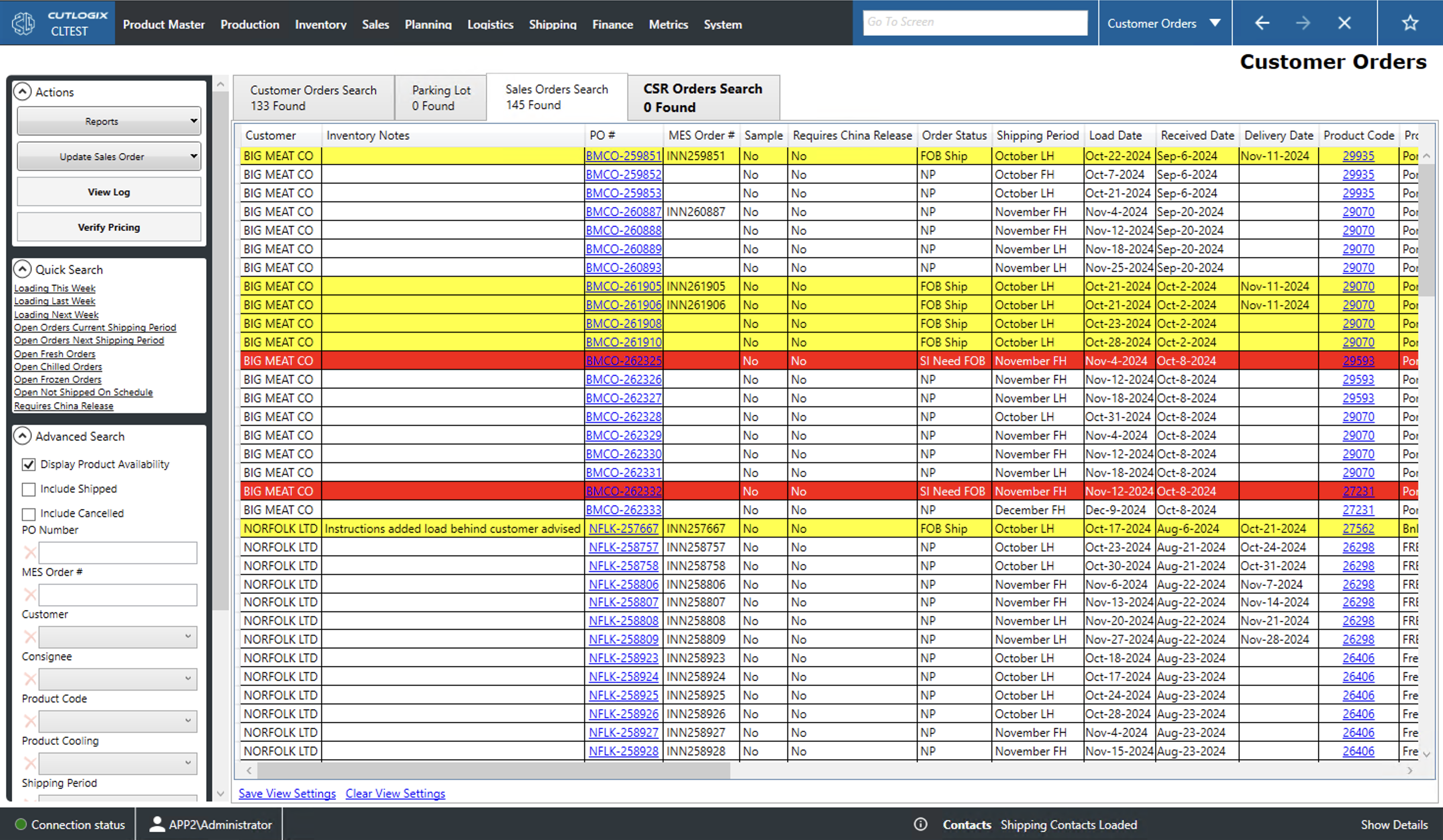
- CSR: The name of the customer service representative (CSR) associated with the sale.
- CSR Notes: A space for the CSR to leave notes about the sale.
- PO Number: The purchase order (PO) number for the order. This is a unique identifier for the order.
- Customer: The name of the customer.
- Requires China Release: Indicates whether this order requires special documentation for shipping to China.
- Load Date: This is the anticipated date that the order will be loaded/shipped.
- Origin: The location from which the order will be shipped.
- Order Status: The status of the sales order.
- Not Verified: A new order that has not passed review.
- Planning: The order is in the planning system to be produced.
- Shipped: The order has been planned, loaded and shipped to the customer.
- SNB: The order has been shipped but not billed.
- Cancelled: The order will no longer be produced for the customer.
- Code: Unique identifier for the product sold.
- Description: Name/description of the product.
- Gross Unit Price: Sale price per unit of the product prior to deductions (taxes, etc.).
- Transfer Price: Price to transfer products between departments, sites, etc.
- Pricing Verified: Indicates whether the sales price has been verified or not.
- Product Cooling: Indicates the product's cooling type (fresh, frozen or chilled).
- Quantity: Weight in kilograms of the product.
- Earliest Date: Indicates the earliest date that the product can be shipped. This is to account for necessary time being cooled or frozen.
- Delivery Terms: Indicates the delivery terms for the order (probably an enum)
- Destination: Where the product is being shipped. May be to a consignee instead of directly to the customer.
- Customer Destination: This is where the product will ultimately end up.
- SailDate: The date that the order is expected to ship.
- Transload: Indicates whether or not the load needs to moved from one mode of transportation to another (truck to rail, rail to boat, etc.).
- Transload Date: The date the transload is expected to take place.
- Extra Label: Indicates whether the product packaging requires an extra label.
- Pre-Payment: Indicates whether the customer will pre-pay for their order.
- Booking Status: Shows the status of the order's booking (request to ship by boat).
- Booking #: A unique identifier for the order's booking.
- Vessel Name: The name of the vessel on which the order will be loaded.
- Drayage: Indicates how an order is expected to move from a port or rail terminal to a distribution center.
- Shipper: Name of the company shipping the order.
- Shipping Consignee: The name of the company designated to receive the order.
- Additonal Instructions: A space for additional instructions about the order to be entered.